Meta lead ads let people send you their details through a form inside Facebook or Instagram. When you connect Meta Lead Ads to salestrack, each new form lead arrives in your Leads list within seconds, with the campaign, ad set and ad that brought it. Your assignment rules give it an owner, so someone can reply on WhatsApp while the person is still thinking about you.
Before you start
- You need admin access to the Facebook Page that runs your lead ads, and access to its lead forms in Meta Business Suite.
- In salestrack you need the Owner or Admin role, or a role with access to Integrations.
- Set up your lead assignment rules first, so the first leads go to the right people.
Connect Meta Lead Ads
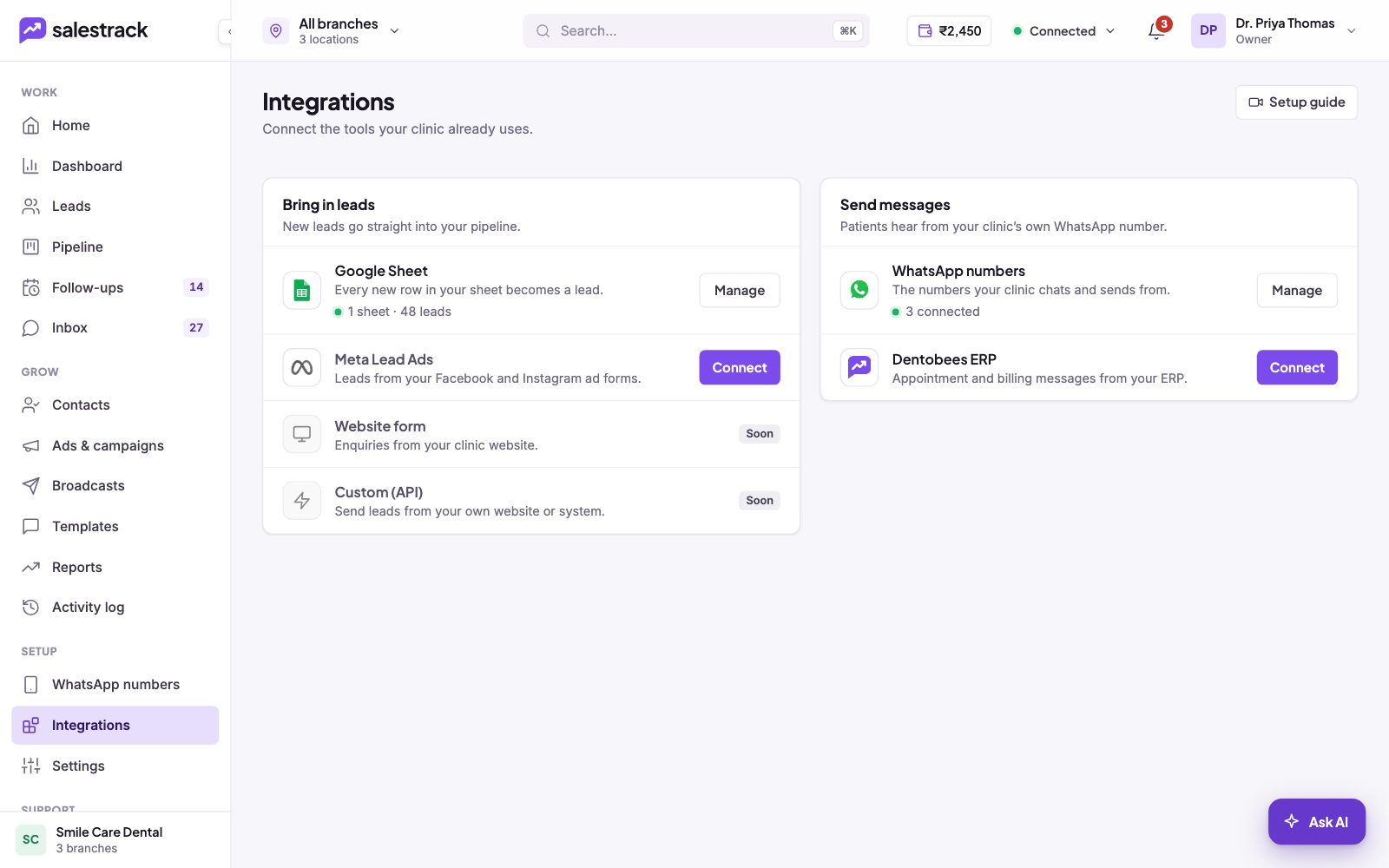
- Open Integrations. In the left menu, under Setup, click Integrations. Find Meta Lead Ads under Bring in leads.
- Click Connect. A side panel opens with the steps, so you stay on the page.
- Sign in with Facebook. Use the Facebook account that manages your Page, and allow salestrack to read your leads when Meta asks.
- Choose your Page and forms. Pick the Page that runs your ads, then the lead forms you want in salestrack. New forms can be added later from Manage.
- Finish and test. Submit a test lead on one of your forms. It should appear on the Leads page in a few seconds, with Meta lead ads as its source.
After the leads arrive
- Each lead shows its source and the campaign, ad set and ad, so you can see later which ads bring customers, not just leads. See Marketing ROI and cost per customer.
- Your lead assignment rules share the leads out. Rules can match words in the form answers or the ad and campaign name.
- Someone who fills in a second form is matched by phone number and marked as a repeat enquiry instead of a new duplicate.
Website forms and your own system
On the Integrations page, Website form and Custom (API) are marked Soon. Until they are live, send website enquiries to a Google Sheet (Google Forms does this for you) and connect the sheet, or export entries to Excel or CSV and import the file.
If something goes wrong
- No leads are arriving. Open Manage on Meta Lead Ads and check that the right Page and forms are selected. The connection status in the top bar turns red when a lead source has a problem.
- You cannot see your Page. The Facebook account you signed in with needs admin access to that Page. Ask the Page owner to give you access, then connect again.
- A lead was not assigned. See Why a lead was not assigned.
Still stuck? Message us on WhatsApp at +91 80860 14345 or email harshad@dentobees.com.
Read next
- Set up lead assignment rules · Help guide
- Sync leads from a Google Sheet · Help guide
- Import leads from Excel or CSV · Help guide
- Connect your WhatsApp number · Help guide
- Facebook lead ads to WhatsApp
- Meta ads ROI
- Integrations
Still stuck? Ask us on WhatsApp.Real people reply Monday to Saturday, 9 am to 9 pm IST. Tell us what you were trying to do and we will send the answer or the right guide.Message supportEmail us