Not every lead will buy. When a lead will not go ahead, close it instead of leaving it in your pipeline. salestrack has three options, and each one is counted differently in reports.
Which one to use
- Lost: a real lead who did not go ahead. Reasons: Not interested, Price too high, Chose another clinic, Not reachable, Not a valid lead, Other. Lost leads count as a loss in your conversion reports and appear in the Lost leads report.
- Not qualified: the enquiry was never a real prospect. Reasons: Wrong number, Spam or fake, Not looking for treatment, Outside our area, Duplicate lead, Other. These are left out of conversion rates, so junk does not pull your numbers down.
- Nurture: the person is interested but not ready now. The lead is parked for later and is not counted as lost.
The reason labels above are the defaults. Your owner or admin can change them under Settings › Labels & lists.
Mark a lead Lost
- Open the lead. Go to the lead page.
- Click Mark lost. It is at the top right of the header.
- Pick a reason. Reason is required. Add a short note if it helps, for example what the customer said.
- Confirm. Click Mark as lost. A message with Undo appears for a few seconds in case you clicked by mistake.
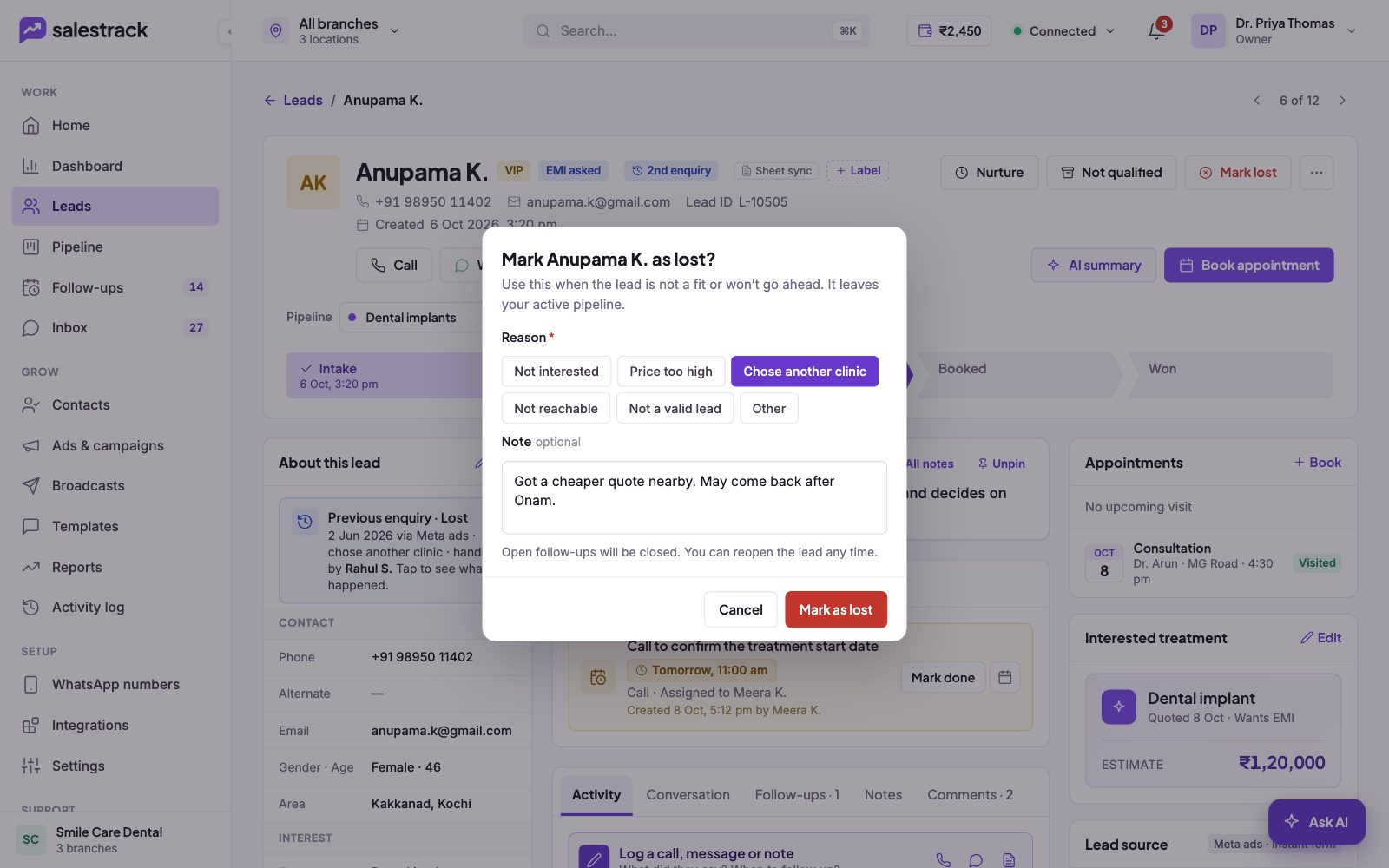
Marking a lead Not qualified works the same way: click Not qualified, pick a reason, add a note if needed, and confirm. For Nurture, click Nurture on the lead page.
You can also close a lead from the Pipeline board by dragging its card onto Lost, Nurture or Not qualified at the bottom.
What happens next
- The lead leaves your active pipeline and the All leads view. Its stage, pipeline and booking are locked, and open follow-ups are closed.
- To find it again, open the Leads list and use the Closed switch.
- A lead in nurture shows an "In nurture" banner. Click Start now when the person is ready, and it returns to the pipeline.
Reopen a lead
Open the closed lead and click Reopen (for a Lost lead) or Mark as qualified (for a Not qualified lead). The lead goes back to the stage it was in. If a closed lead messages or enquires again, salestrack reopens it and shows it as a repeat enquiry.
Read next
- Everything on the lead page · Help guide
- Move leads through the pipeline · Help guide
- Repeat enquiries and duplicate leads · Help guide
- Find where leads drop off (sales funnel) · Help guide
- Lead management feature
- Reports feature