A pipeline is the set of steps a lead goes through, from first enquiry to won. Your business can have more than one pipeline, each with its own stages. The Pipeline board shows one pipeline at a time, so you can see where every lead stands and move them forward.
Read the board
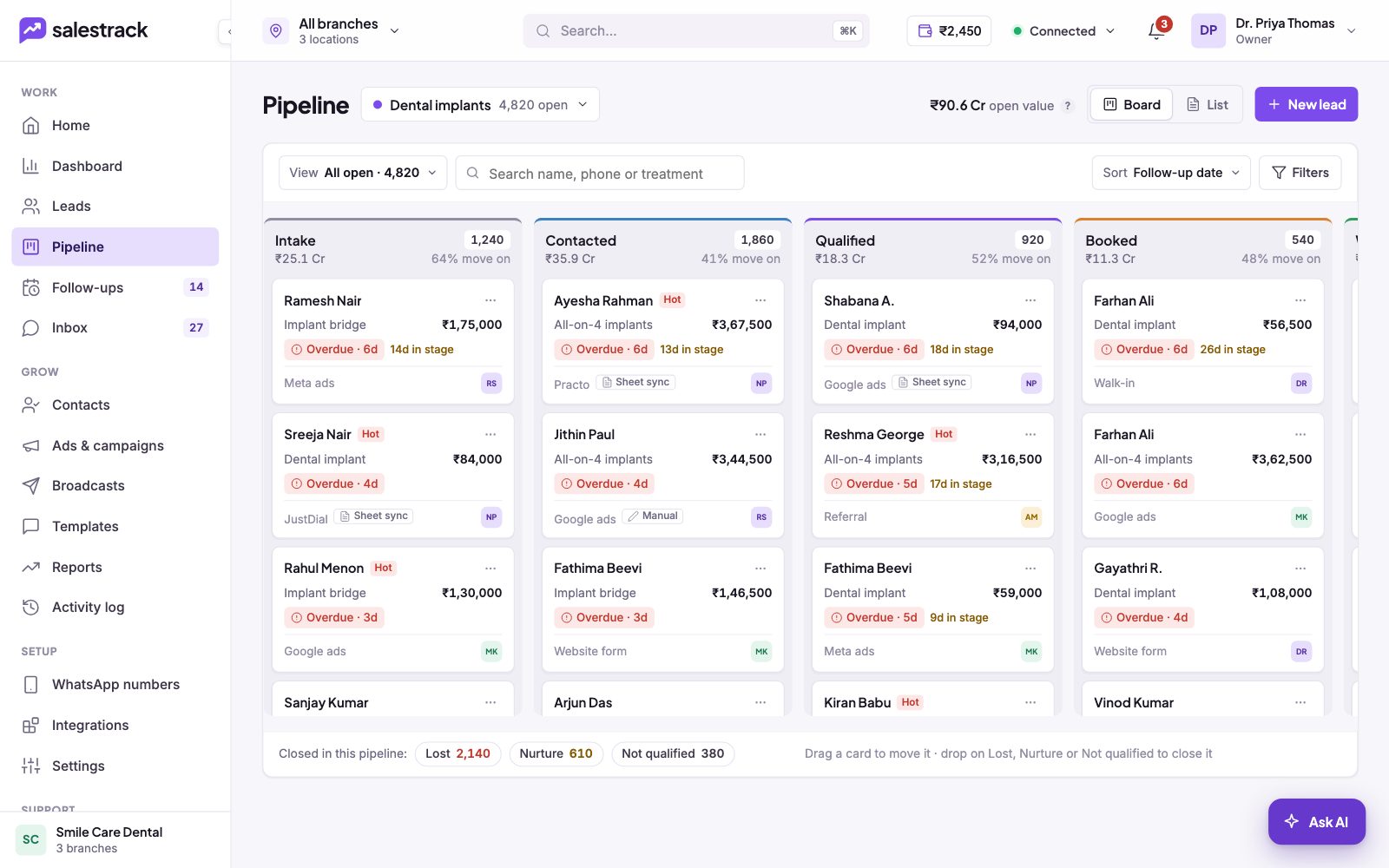
In the left menu, under Work, click Pipeline. At the top:
- The pipeline picker shows the pipeline name and how many leads are open. Click it to switch pipelines.
- Open value is the total estimated value of open leads in this pipeline.
- Board and List switch between columns and a table.
- New lead adds a lead.
Each column is a stage. Its header shows how many leads are in it, their value, and the "% move on" (how many leads go on to the next stage). Each card shows the lead's name, labels such as Hot, what they are interested in, the value, the follow-up date (red "Overdue" when late), days in stage, source and the owner's initials. At the bottom of a column, Load 10 more shows more cards.
Move a lead
- Find the card. Use the search box to look up a name, phone or treatment.
- Drag it. Drag the card to the next stage. You can move a lead back too.
- Close it if needed. Drop the card on Lost, Nurture or Not qualified in the bar at the bottom. For Lost and Not qualified, salestrack asks for a reason.
- Or open the lead. Click a card to open the lead drawer, or go to the lead page and click a stage on the stage bar.
Find leads that need attention
Use the View menu for quick views:
- All open: every open lead in the pipeline.
- Overdue: the follow-up date has passed.
- No follow-up: no next step is planned.
- Stuck 7d+: the lead has not moved for a week or more.
- Hot: leads labelled Hot.
Use Sort to order cards by Follow-up date, Newest first, Value: high to low, Longest in stage or Name A–Z, and Filters to narrow down further.
Read next
- Everything on the lead page · Help guide
- Mark a lead Lost, Not qualified or Nurture · Help guide
- Schedule follow-ups and clear overdue ones · Help guide
- Lead management feature
- Sales reports and KPIs