The dashboard is the first screen for owners, admins and managers. It is not a full report. It answers two questions quickly: what needs action right now, and is the business on track? Each section links to the page where you can act or dig deeper.
Open and filter it
- Open Dashboard. In the left menu, under Work, click Dashboard.
- Pick the dates. Use the date filter at the top right: All time, Today, Last 7 days, Last 30 days or This month.
- Pick the branch. Choose All branches or one branch. Every number on the page follows this filter.
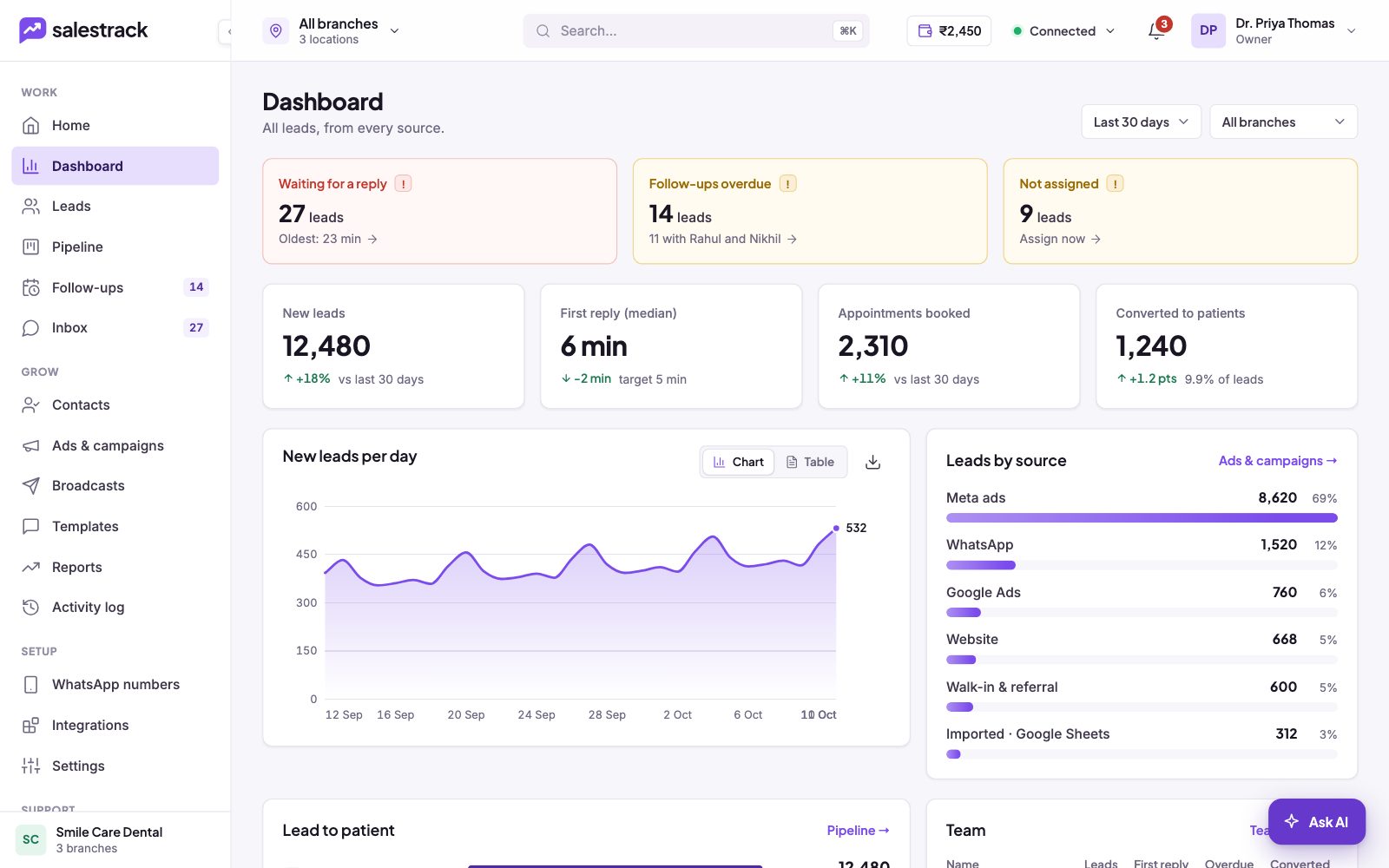
Action cards: what needs you now
The three cards at the top turn red when they are not zero. Clear these first.
- Waiting for a reply. Leads who messaged and have not had a reply, with how long the oldest has waited. Click to open the list and reply.
- Follow-ups overdue. Follow-ups past their due time, and which team members have most of them.
- Not assigned. Leads with no owner. Click Assign now to give them to someone.
Key numbers: are we on track?
- New leads. Leads created in the chosen dates, with the change from the previous period.
- First reply (median). How long a typical lead waits for the first reply, shown against a target of 5 minutes. Lower is better.
- Appointments booked. Leads who booked, with the change from the previous period.
- Converted to patients. Leads who became customers, and what share of all leads that is.
Charts and tables below
- New leads per day. A daily chart. Switch to Table to see the numbers.
- Leads by source. How many leads came from each source (Meta ads, WhatsApp, Google Ads, website, walk-in and referral, imports) and each one's share. Click Ads & campaigns → for campaign detail.
- Lead funnel. Five steps: New, Contacted, Qualified, Booked, Converted. Each step shows how many moved on and how many dropped. Click Pipeline → to work the leads.
- Team. Each person's leads, first reply time, overdue follow-ups and conversions. Click Team report → for the full Team performance report.
What agents see instead
Agents, tele-callers and front desk staff get My day: their own new leads, leads waiting for a reply, follow-ups due and a "Do next" queue. It keeps them focused on the next lead to touch.
Read next
- Which report should I check? · Help guide
- Find where leads drop off (sales funnel) · Help guide
- Schedule follow-ups and clear overdue ones · Help guide
- Why a lead was not assigned · Help guide
- Reports feature
- Speed to lead
Still stuck? Ask us on WhatsApp.Real people reply Monday to Saturday, 9 am to 9 pm IST. Tell us what you were trying to do and we will send the answer or the right guide.Message supportEmail us